Upload Steam Leaderboard Score With UGC
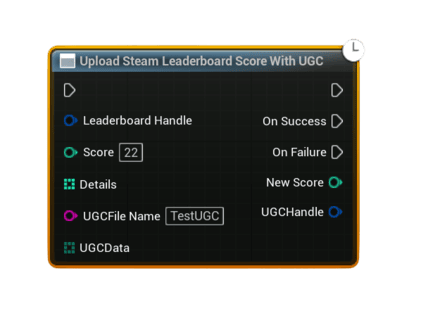
Uploads a leaderboard score and attaches a UGC file in a single async call. This is useful for sending complex data like replays, ghost runs, screenshots, JSON save blobs, or any other binary payload together with a score.
- Important – Steam Cloud / Remote Storage: UGC upload and download require Steam Cloud to be enabled for your app in Steamworks.
- In your app’s Steamworks settings, enable Steam Cloud and set:
- a reasonable Byte quota per user (enough for your replay / ghost / save data), and
- a reasonable Number of files allowed per user.
- If these values are
0or too low, UGC operations may fail or be rejected, causing the UGC nodes to fire On Failure.
Inputs
Pin |
Type |
Description |
|---|---|---|
Leaderboard Handle |
FSAL_LeaderboardHandle |
Valid handle obtained from Find Steam Leaderboard or Create Steam Leaderboard. |
Score |
int32 |
Score value to upload to this leaderboard. Uses the Keep Best method internally. |
Details |
int32[] |
Optional per-score metadata array (same as in the normal upload node). Can be empty. |
UGC File Name |
String |
File name to use in Steam Remote Storage for this UGC payload (no path, just the name). If left empty, a name like SteamSAL_UGC_<timestamp>.json is auto-generated. |
UGC Data |
uint8[] |
Binary contents to write into the UGC file. Use helper nodes (e.g. String To Bytes (UTF8)) if you want to send text/JSON; or build your own binary format for replays/ghosts. |
Outputs
Pin |
Type |
Description |
|---|---|---|
On Success |
Exec |
Fired when the UGC file is written, shared, the score is uploaded, and the UGC handle is successfully attached. |
On Failure |
Exec |
Fired if any step in the chain fails (invalid handle, empty data, Steam not available, file write failure, upload failure, etc.). |
New Score (On Success) |
int32 |
Final score value reported by Steam after upload (may differ if clamped or overridden by Steam). |
UGC Handle (On Success) |
FSAL_UGCHandle |
Handle to the shared UGC file attached to this score. Use this later when resolving or downloading the UGC. |
What this node does internally
- Writes
UGC Datato Steam Remote Storage using the givenUGC File Name(or an auto-generated one). - Shares that file to obtain a Steam UGC handle.
- Uploads the leaderboard score using Keep Best as the upload method.
- Attaches the shared UGC handle to the uploaded score via
AttachLeaderboardUGC.
Usage
- Make sure Steam is available and you already resolved the Leaderboard Handle via Find or Create.
- Prepare your
UGC Data:- For text/JSON: build a string and convert it to bytes with String To Bytes (UTF8).
- For custom binary formats (replays, ghosts, etc.): serialize into a
uint8[]however you prefer.
- Call Upload Steam Leaderboard Score With UGC with:
Leaderboard HandleScore- Optional
Details - Optional
UGC File Name(leave empty to auto-generate) UGC Data(must not be empty)
- On Success, store the returned
UGC Handletogether with the score or player data if needed, or rely on the handle exposed later through Get Downloaded Leaderboard Entry.
Notes
- If
Leaderboard Handleis invalid, orUGC Datais empty, the node fails immediately with an explanatory error message. - The node requires both Steam Remote Storage and Steam User Stats to be available; otherwise it will fire On Failure.
- Cloud status and quota are logged to the output log for easier debugging (account/app enabled state and space usage).
- The UGC file is stored in Steam Cloud bound to your AppID. Make sure Steam Cloud is enabled in your Steamworks settings if you plan to rely on this.
- Later, when you download leaderboard rows, you can check Has UGC and read the associated UGC Handle from Get Downloaded Leaderboard Entry to find and download the attached payload.