Reading Player Stats
Steam Stats are numeric values that track player progress across sessions (e.g., total jumps, enemies defeated, matches won).
Before you can read or update stats in-game, you must first create them in your Steamworks Admin Panel:
👉 Steamworks Docs – Stats & Achievements
Example Workflow
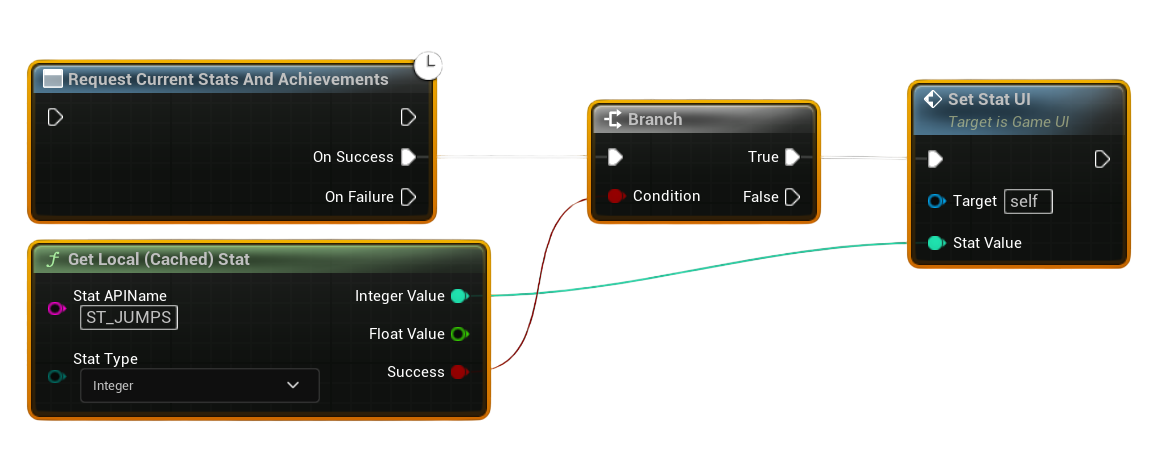
- Request Current Stats
- At the start of a session, call Request Current Stats and Achievements.
-
This ensures all local stat values are synced with the Steam backend.
-
Get Local Stat
- Use Get Local Stat with the Stat Name you defined in Steamworks Admin Panel.
-
This returns the player’s current value for that stat.
-
Use the Stat in Game Logic
- The returned value can be displayed on-screen, used for gameplay checks, or updated later.
Notes
- Stats must be predefined in the Steamworks Partner Site. Attempting to read a stat that doesn’t exist will fail.
- Always call Request Current Stats before reading values, otherwise the local cache may be out of date.
- Stats are typically integers or floats, but you can design them around your gameplay needs (e.g., “TotalDeaths”, “TotalWins”).
- Use Store Stats after updating values to make sure changes are saved permanently.