Download Steam Leaderboard Entries
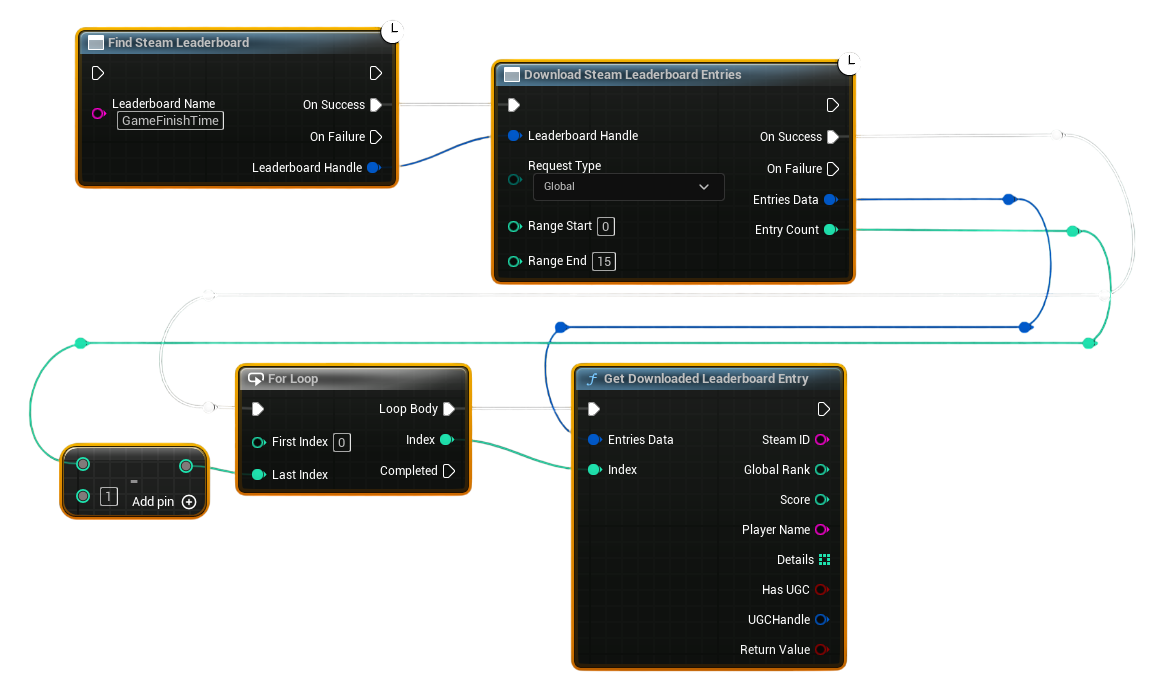
This example shows how to download leaderboard entries using the new Download Steam Leaderboard Entries node and then read each entry using Get Downloaded Leaderboard Entry.
Example Workflow (Updated for v1.2.0)
1. Find the Leaderboard
- Use Find Steam Leaderboard with your leaderboard name.
- On Success, you receive a valid Leaderboard Handle.
- Pass this handle into the next step.
2. Download Leaderboard Entries
- Use Download Steam Leaderboard Entries.
- Connect the Leaderboard Handle from step 1.
- Choose your Request Type:
- Global – download a rank range (top N).
- Global Around User – download entries around the local player's position.
- Friends – download only Steam friends.
- Fill Range Start / Range End depending on request type.
- On Success, the node returns:
- Entries Data (a compact container of all rows)
- Entry Count (how many rows were downloaded)
3. Process Each Entry
Use a For Loop:
- First Index =
0 - Last Index =
Entry Count - 1
Inside the loop body, call:
Get Downloaded Leaderboard Entry
- Connect Entries Data from the download node into its input.
- Pass the current loop Index.
- The node outputs a full row:
- SteamID
- Player Name
- Global Rank
- Score
- Details[]
- Has UGC
- UGC Handle
Use these values to populate your UI or scoreboard widgets.
Optional: Get Only One Entry (No Loop Needed)
If you know the exact index you want:
- Simply call Get Downloaded Leaderboard Entry directly.
- Pass:
- Entries Data
- Your chosen Index
Useful for:
- Displaying only the top score
- Showing the player’s own rank
- Debugging specific entries
Notes
- This replaces the old array-returning node.
- Data stays cached until you run another download request.
- For UGC-enabled leaderboards, check Has UGC and use Download Steam UGC File to retrieve the attached data.