Unlocking an Achievement
Achievements should only be unlocked after certain conditions in your game are met.
This workflow ensures you check the current state, unlock it if needed, and then store the results.
Example Workflow
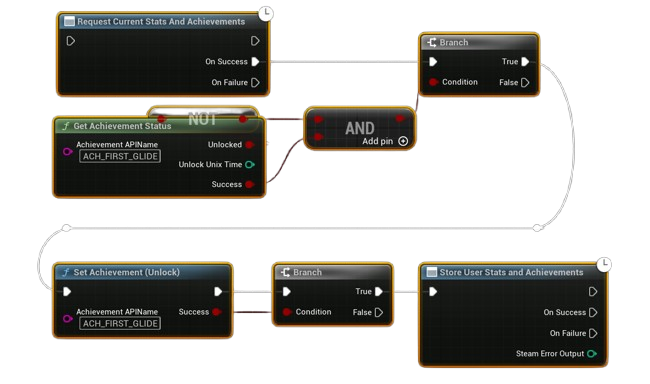
- Request Current Stats and Achievements
-
Always start by syncing the latest stats/achievements from Steam.
-
Check Achievement Status
- Use Get Achievement Status with the API name of your achievement.
-
If it is not unlocked, continue.
-
Set Achievement (Unlock)
-
Trigger this when the gameplay condition is met (e.g., first glide, reaching a milestone).
-
Store User Stats and Achievements
- Finally, call Store Stats so the unlock is saved permanently on the Steam backend.
- Steam will also display the unlock notification to the player.
Notes
- Always check status first to avoid trying to unlock an already unlocked achievement.
- Store Stats is required, otherwise the achievement won’t persist.
- Use meaningful API names (set in your Steamworks dashboard) like
ACH_FIRST_GLIDE.