Set Local (Cached) Stat
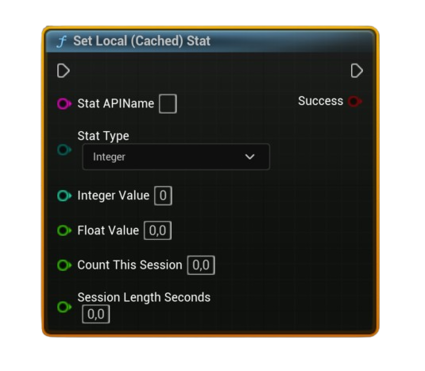
Writes a user stat into the local Steam cache. Choose the Stat Type and fill the matching value pins (Integer / Float, or AvgRate: Count & Seconds). Call Store User Stats & Achievements afterward to persist.
Inputs
Pin |
Type |
Description |
|---|---|---|
Stat API Name |
String |
Exact stat identifier defined in Steamworks (e.g., ST_KILLS). |
Stat Type |
Enum (Integer / Float / Average) |
Select which kind of stat you’re writing. |
Integer Value |
int32 |
Used when Stat Type = Integer. |
Float Value |
float |
Used when Stat Type = Float. |
Count This Session |
float |
Used when Stat Type = Average: number of occurrences in this measurement window. |
Session Length Seconds |
float |
Used when Stat Type = Average: duration (seconds) for the above count; must be > 0. |
Outputs
Pin |
Type |
Description |
|---|---|---|
Success |
Bool |
true if the value was written to the local Steam cache. |
Notes
- Call Request Current Stats And Achievements once before using this node (initializes the local cache).
- This does not upload by itself—finish with Store User Stats & Achievements to persist to Steam.
- Integer →
SetStat(int), Float →SetStat(float), Average →UpdateAvgRateStat(Count, Seconds)(Seconds must be > 0). - For Average stats, the stored value is a float rate; when reading, use your “Get Stored Stat” node with Stat Type = Average to retrieve the float.
- Failures typically indicate Steam isn’t available (check Is Steam Available) or a bad Stat API Name.
Typical usage
- On kill: Set Local (Cached) Stat (
ST_KILLS, Integer += 1) → periodically Store User Stats & Achievements. - For DPS/Rate: accumulate Count This Session over Session Length Seconds → Set Local (Cached) Stat with Average → Store.