Upload a Score to Leaderboard
Once you have created or found a leaderboard, you can upload player scores to it.
Here’s a typical workflow in Blueprints:
Example Workflow
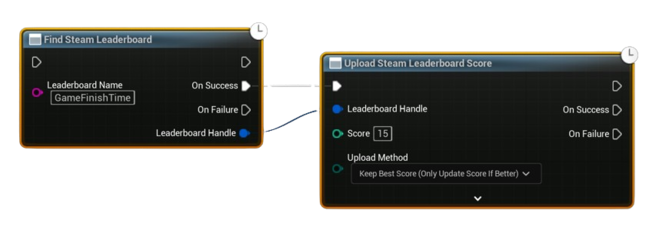
- Find the Leaderboard
- Use the Find Steam Leaderboard node.
- Input the Leaderboard Name you created earlier.
-
The node returns a Leaderboard Handle on success.
-
Upload the Score
- Pass the Leaderboard Handle into the Upload Score to Leaderboard node.
-
Provide the player’s score (time, points, etc.) and choose the upload method:
- Keep Best (Steam keeps the best score)
- Force Update (always overwrite with the new score)
-
Handle the Callback
- On success, you’ll receive confirmation that the score was uploaded.
- On failure, log the error or retry.
Notes
- Make sure the leaderboard exists (either created in-game or via Steamworks Partner Site).
- Uploading will automatically update the player’s position in the leaderboard.
- Use Keep Best for time-attack or high-score leaderboards, and Force Update if you want the most recent score to always be shown.