Download Steam UGC File
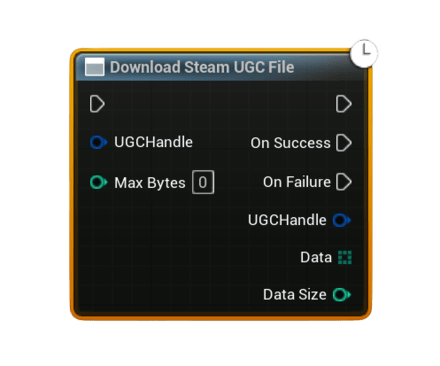
Downloads the raw binary data of a UGC file from Steam Remote Storage using a UGC handle. Use this together with leaderboard entries that have UGC attached to retrieve complex payloads like replays, ghost runs, screenshots, JSON blobs, or any other custom data you previously uploaded.
- Important – Steam Cloud / Remote Storage: UGC upload and download require Steam Cloud to be enabled for your app in Steamworks.
- In your app’s Steamworks settings, enable Steam Cloud and set:
- a reasonable Byte quota per user (enough for your replay / ghost / save data), and
- a reasonable Number of files allowed per user.
- If these values are
0or too low, UGC operations may fail or be rejected, causing the UGC nodes to fire On Failure.
Inputs
Pin |
Type |
Description |
|---|---|---|
UGC Handle |
FSAL_UGCHandle |
A valid UGC handle, typically obtained from Get Downloaded Leaderboard Entry (Has UGC + UGC Handle) or from Upload Steam Leaderboard Score With UGC. |
Max Bytes |
int32 |
Optional hard upper limit for bytes to download. <= 0 = no explicit limit (download full file size). If positive, the node will download at most this many bytes from the file. |
Outputs
Pin |
Type |
Description |
|---|---|---|
On Success |
Exec |
Fired when the UGC file is successfully downloaded and read from Steam Remote Storage. |
On Failure |
Exec |
Fired if the handle is invalid, Steam Remote Storage is unavailable, or the download/read operation fails. |
UGC Handle (On Success) |
FSAL_UGCHandle |
Echo of the input handle for convenience and chaining. |
Data (On Success) |
uint8[] |
Raw bytes of the downloaded UGC file. Use helper nodes like Bytes To String (UTF8) or Save Bytes To File depending on how you want to consume it. |
Data Size (On Success) |
int32 |
Number of bytes actually downloaded (may be less than file’s total size if Max Bytes was set). |
Error Message (On Failure) |
String |
Human-readable description of why the operation failed. |
Usage
- Download leaderboard entries using Download Steam Leaderboard Entries or Download Steam Leaderboard Entries (Users).
- For each row, call Get Downloaded Leaderboard Entry and check Has UGC.
- If Has UGC is true, pass the returned UGC Handle into Download Steam UGC File.
- On Success, you receive the raw
Dataas auint8[]plusData Size:- For JSON / text payloads, convert back using Bytes To String (UTF8).
- For binary formats (replays, ghosts, screenshots, etc.), either parse the bytes in Blueprint/C++ or save them to disk with Save Bytes To File.
Notes
- If the UGC Handle is invalid, the node fails immediately with an error message.
- The node requires Steam Remote Storage to be available; if it is not, On Failure is fired.
- The full file size is obtained from Steam first. If
Max Bytesis set and smaller than that size, only the firstMax Bytesare read. - If Steam returns 0 or a negative byte count, the node fails and reports the issue via Error Message.
- This is the counterpart of Upload Steam Leaderboard Score With UGC: use that node to upload complex data together with a score, and this node to download and reconstruct that data later.