Creating a Steam Leaderboard
Before you can upload or download scores, you need a Steam Leaderboard to exist for your game.
There are two ways to create one:
Option 1 – Using the Plugin (Blueprint Node)
SteamSAL exposes a Blueprint node:
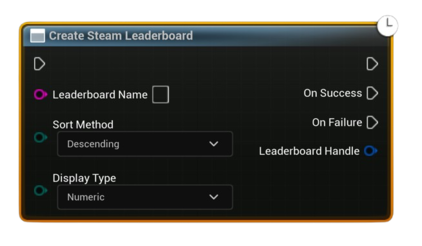
Create Steam Leaderboard
- This node creates a new leaderboard dynamically if it doesn’t already exist.
- You define:
- Leaderboard Name (must be unique per game)
- Sort Method (Ascending or Descending)
- Display Type (Numeric, Time, etc.)
⚠️ Once created, a leaderboard’s properties (sort method, display type) cannot be changed. If you need different rules, you must create a new leaderboard with a different name.
Use this method if you want to manage leaderboards from inside your game without touching the Steamworks backend.
Option 2 – Using Steamworks Partner Site
You can also create and manage leaderboards directly from your game’s Steamworks Admin Panel:
👉 Steamworks Partner: Leaderboards Documentation
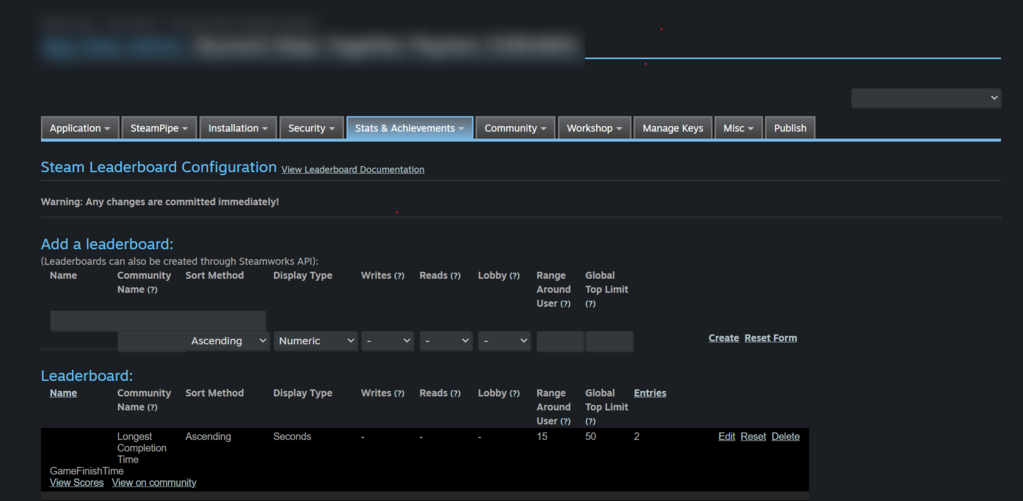
Steps:
1. Log in to your Steamworks Partner account.
2. Select your game from the dashboard.
3. Navigate to Leaderboards under the Stats & Achievements section.
4. Create a new leaderboard, specifying:
- Name
- Sort method
- Display type
This method is recommended if you prefer centralized control and want to configure leaderboards before shipping your game.
Which Should I Use?
- Use Blueprint node if you want flexibility and automated setup (good for prototyping or dynamic leaderboards).
- Use Steamworks Partner Site if you want strict control and manage everything before release.
Both approaches are valid — once a leaderboard exists, you can access it in-game through the same workflow.